
What Stacking Actually Does
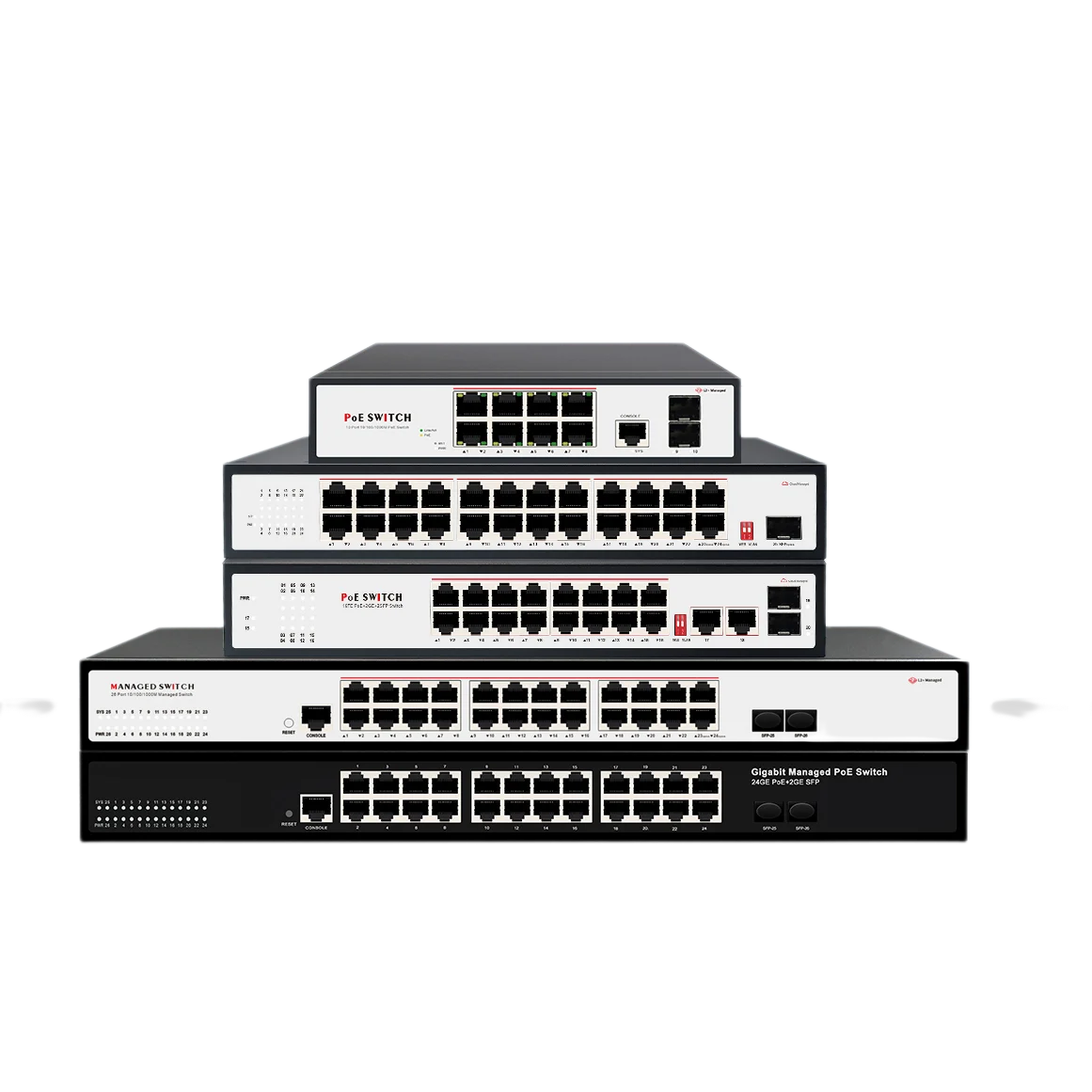
In the real world, stacking solves a specific headache: managing multiple switches as separate boxes is a waste of time. Technically, stacking is a switch virtualization technology. It binds two or more physical switches into a single logical unit. You stop seeing Switch A, Switch B, and Switch C. Instead, you log into one IP address and manage a unified backplane.
The industry reference for this is often IEEE 802.3ad for link aggregation concepts, but the actual stacking logic is handled by proprietary ASICs on the backplane. It is not trunking. It is not clustering. It is a dedicated hardware loop that merges the control planes. The member switches share a single MAC address table, a single routing table, and a single configuration file.
When we ship units from the Wanglink factory floor, we often pre-load priority values for master election. The Master unit handles all management protocols. If the Master goes silent, the Slave with the highest priority steps up without rebooting the stack. This failover usually cuts over in under 50 milliseconds, which keeps PoE cameras and access points alive without a blip.
How The Stacking Engine Works
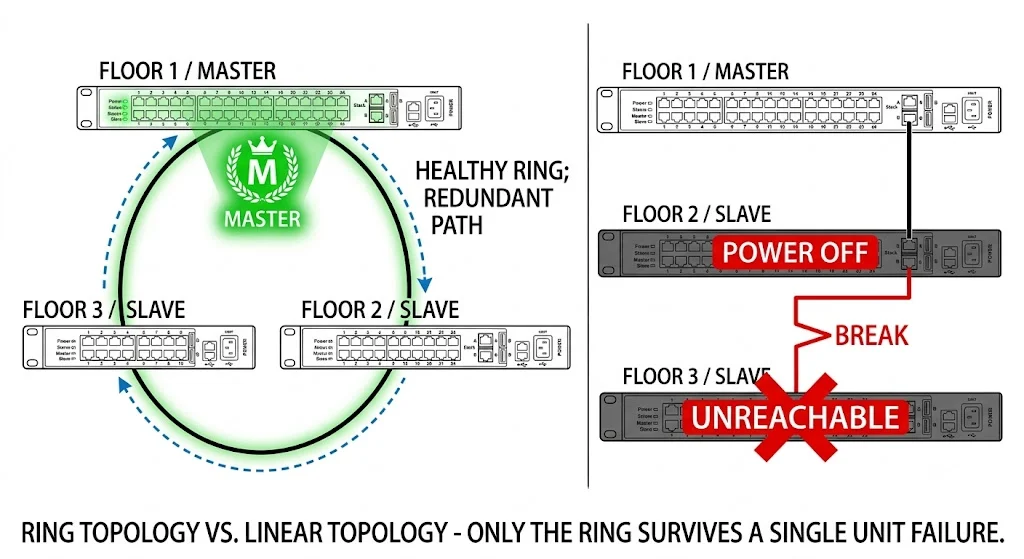
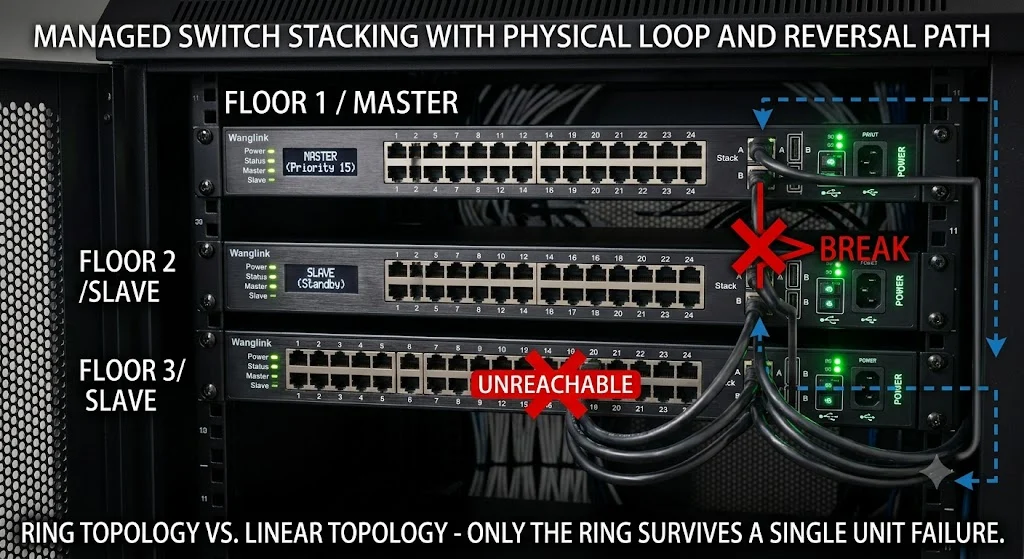
The brain of the operation is the stack port, usually a high-speed proprietary interface on the rear of the chassis. The cabling creates a closed ring topology. Data flows in one direction. If a single cable snaps in that ring, the ring breaks but data immediately reverses direction on the remaining path. This bidirectional failover loop is the core mechanism keeping the stack alive.
Let’s lay out the boot sequence step-by-step so it connects to the real world:
- Physical Connection: You plug the stacking cables into the dedicated uplink slots. The ports auto-detect the neighbor.
- Topology Discovery: The ASIC pings the adjacent switch. It maps the physical ring. The stack determines how many hops exist from unit 1 to unit 3.
- Master Election: This is not random. The switch with the highest priority value wins. If priority is tied, the unit with the lowest MAC address grabs Master role. This deterministic logic prevents split-brain scenarios.
- Database Merge: The Master copies its startup-config to the Slaves. All units now share an identical firmware version check. If a Slave runs a different firmware, the Master pushes the correct image automatically.
- Forwarding Sync: Layer 2 MAC tables and Layer 3 routing tables synchronize. A packet arriving on the last port of Switch 3 now knows exactly where the destination is on Switch 1 without flooding the ring.
Key Technical Parameters
These numbers come straight from the lab testing bench at Wanglink. If you ignore these thresholds, the stack collapses under production load.
| Parameter | Typical Range | What It Does | Real-World Impact |
|---|---|---|---|
| Stack Bandwidth | 40 Gbps – 200 Gbps | Backplane capacity between units | Determines if the ring chokes on CCTV megapixel streams. Below 80 Gbps is risky for video-heavy networks. |
| Max Stack Members | 4 to 9 units | Physical port density scale | WISP tower projects usually cap at 4 units due to power budget constraints in the cabinet. |
| Failover Time | Master to Slave takeover speed | Keeps SIP calls alive. Any delay over 200 ms will drop registrations. | |
| Max Distance | 1m – 100m (active fiber) | Physical cable reach | Standard Direct Attach Copper (DAC) is cheap but locks you to 3 meters; long-reach stacking uses fiber modules. |
Stacking vs. Clustering vs. LACP
Even seasoned engineers mix these up. The distinction lies in the control plane.
- Stacking: Shared control plane. One brain. One configuration error breaks everything.
- Clustering (like Cisco HSRP/VRRP): Separate control planes. Each switch runs its own OS. If Switch A has a bad VLAN setting, Switch B still works.
- LACP (Link Aggregation): No shared control plane. It bonds ports for bandwidth only, not management simplicity. You still manage two separate switches.
We tell new support engineers: if you need to blame one device, you are stacking. If you blame two separate devices in a virtual IP, that is clustering.
Advantages and Where To Use It
Stacking shines when managing many edge ports, not when doing heavy inter-VLAN routing in a data center. It reduces the number of IP nodes in your SNMP software.
Fitting the Right Projects
- Small Office LAN: Two 24-port switches stacked. Looks like one 48-port chassis for half the price.
- Warehouse PoE: Nine switches stacked for CCTV deployment. Single management portal to shut/no-shut camera ports.
- Campus Access Layer: Redundant fiber links between building floors. A ring topology keeps the network up even if the physical link between floor 1 and 2 is cut.
Limitations to Watch For
- Software Bug Domain: A memory leak on the Master affects every Slave. The blast radius is huge.
- Firmware Hell: You cannot hot-patch a Slave. The whole stack must reboot for major updates.
- Speed Mixing: You cannot stack a 10G switch with a 1G switch. The ASIC will refuse the adjacency.
Where This Is Heading
The trend is moving away from proprietary copper stacking cables toward Ethernet Virtual Fabric or standardized MC-LAG. We see large enterprise projects adopting spine-leaf architectures with EVPN-VXLAN instead of massive 8-member stacks. However, for the SMB edge, deep buffer stacking for burst Wi-Fi traffic remains extremely practical.
Similar Technologies Head-to-Head
| Feature | Switch Stacking | Multi-Chassis Lag (MLAG) | VRRP/HSRP |
|---|---|---|---|
| Control Plane | Shared (Single Master) | Separate (Sync via Peer-Link) | Separate (Independent) |
| Configuration | One config file for all | Two configs (mirrored manually) | Two configs (different IPs) |
| Link Utilization | Ring can bottleneck | All uplinks active/active | Active/Standby (one link idle) |
| Typical Latency | Sub-microsecond across units | Microsecond via Peer-Link | Millisecond (gateway handover) |
| Best For | Campus Access Ports | Data Center TOR Servers | Edge Gateway Redundancy |
Wiring The Stack In Practice
Let’s look at a typical Wanglink project deployment for a 3-floor office with surveillance requirements. We need to avoid a single point of failure cutting the video recording feed to the NVR on Floor 1.
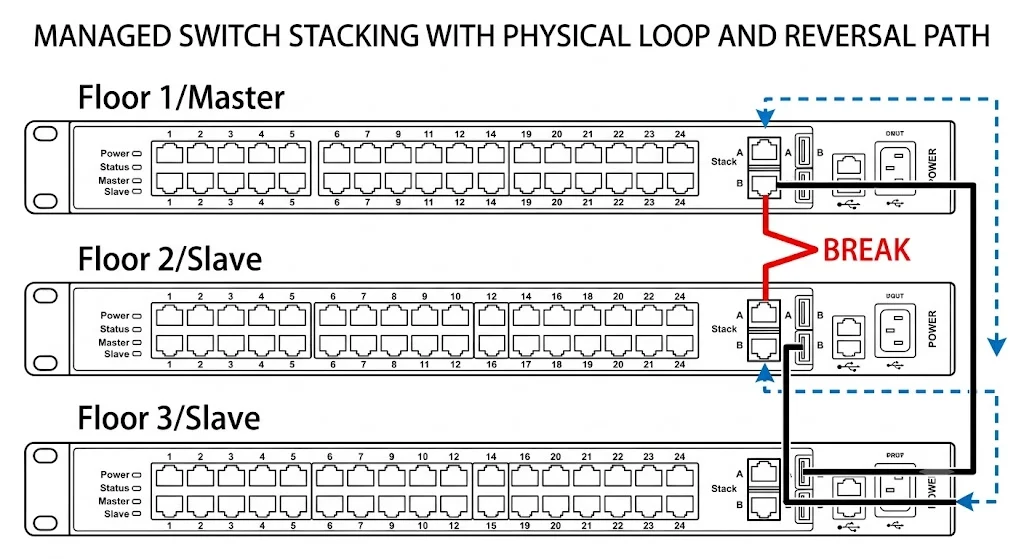
The physical cabling ensures that if the riser cable between the first and second floor gets crimped during building maintenance, traffic from Floor 2 flows up to Floor 3 via the crossover link, then down to the Master on Floor 1. The NVR continues recording without dropping frames.
For the IP settings, we only assign one VLAN interface. Port numbering changes logically. Instead of referencing “Switch 2, Port 15”, the software auto-numbers it as GigabitEthernet 2/0/15. The slot number tells you the physical unit. If a camera goes dark, looking at Gi3/0/10 instantly points the field technician to the third switch in line without tracing cables.
Common Mistakes in the Field
Based on our global WISP and weak-current engineering support tickets, these are the top misconceptions.
1. “Crossing Cables for Redundancy is Optional”
False. If you daisy-chain Switch 1 to 2, and 2 to 3, but fail to close the loop from 3 back to 1, you have built a series circuit. That is not a stack; it is a relay race. Power-off Switch 2, and Switch 3 becomes instantly invisible. Always close the ring. The ring is the guarantee.
2. “Stacking Doubles Throughput”
Stacking is for high availability and unified management, not linear throughput multiplication. A 100G stacking ring shared by three nodes is still a 100G bus. It is a shared pipe. If you need wire-speed non-blocking switching across units, stacking often struggles where a modular chassis switch excels.
3. “Any Port Works”
It absolutely does not. Standard RJ45 gigabit ports cannot be used for stacking except in very low-end virtualized software implementations. Real stacking requires dedicated SFP28, QSFP, or proprietary HDMI-style physical interfaces. Pressing an RJ45 cable into stacking service will cause chronic CRC errors and timeouts.
4. “Mixed Brands Are Fine”
Stacking logic is not an open standard like OSPF. It is proprietary firmware code. Wanglink stacking modules cannot negotiate a master-slave relationship with a Broadcom-based competitor. Even mixing different chip generations inside the same brand can fail without a firmware compatibility table check.