1 Basic Definitions – What Are Cat6 and Cat6a?
If you’ve been around cabling projects, you know the drill: Cat5e is the bare minimum for gigabit, Cat6 is the common upgrade, and Cat6a is the one people keep asking “Do I really need it?” Let’s nail down the names first.
- Cat6 (Category 6) – A twisted‑pair copper cable standard ratified by TIA/EIA. It handles frequencies up to 250 MHz and is designed for Gigabit Ethernet (1000BASE‑T) and short‑run 10‑Gigabit Ethernet (10GBASE‑T) up to 55 meters.
- Cat6a (Augmented Category 6) – An improved version that pushes the frequency to 500 MHz. It supports 10GBASE‑T over the full 100‑meter channel length without extra tricks like alien crosstalk cancellation.
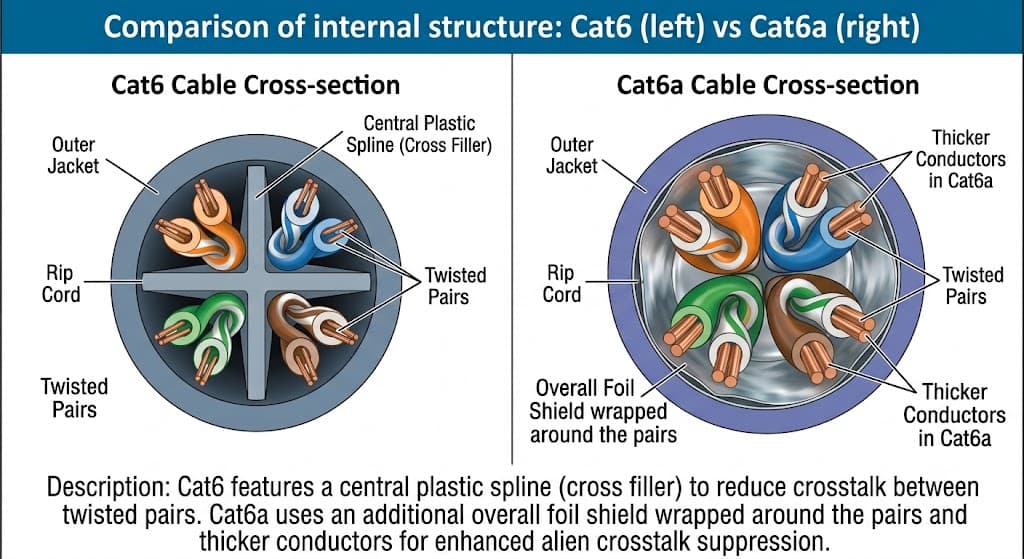
Both use four twisted pairs and an RJ45 connector, but the internal construction differs. Cat6a has thicker conductors, tighter twists, and often a heavier shield or separator to kill interference.
Real‑world hangup: In a typical office, you’ll see Cat6 patch panels everywhere. But when a client asks for 10G backbone runs from floor to floor, a 90‑meter horizontal run with Cat6 will fail at full speed. That’s where Cat6a steps in.
2 How They Work – The Simple Engineering Behind the Numbers
Both cables work by transmitting differential signals over twisted pairs. The twist cancels electromagnetic interference (EMI) from outside and from adjacent pairs. But as data rates climb, two problems appear:
- Near‑End Crosstalk (NEXT) – Signal leaking from one pair into another at the same end of the cable. Cat6 uses a plastic spline to physically separate pairs, reducing NEXT.
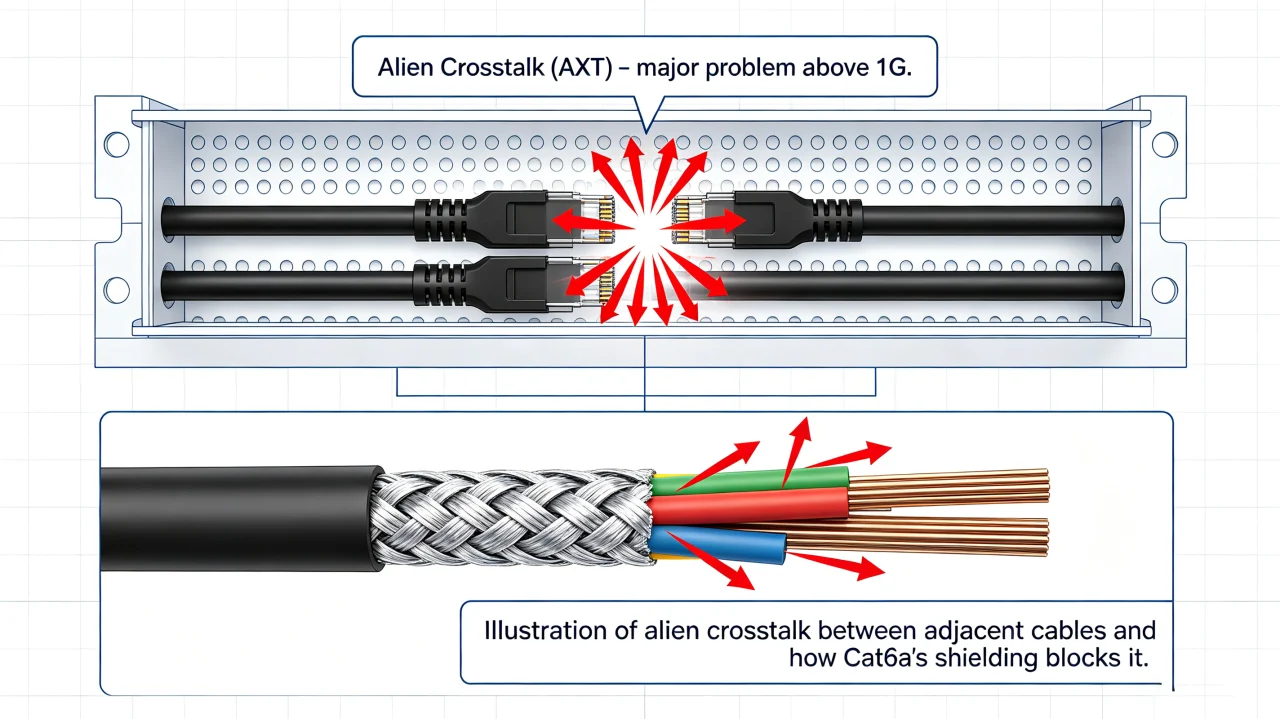
- Alien Crosstalk (AXT) – Interference between cables bunched together in a bundle. At 10G speeds, AXT becomes the bottleneck. Cat6a counters this with thicker insulation and often a foil or braid shield.
Example from the field: We once ran a 70‑meter Cat6 link between two switches in a warehouse to carry 10G for surveillance storage. The link kept dropping to 1G. After swapping to Cat6a, the link locked at 10G. The difference? AXT from the 30 cables packed in the same tray. Cat6 wasn’t bad – it just couldn’t handle the interference at that distance.
3 Key Technical Parameters – Compare with a Table
| Parameter | Cat6 | Cat6a | What It Affects in Real Projects |
|---|---|---|---|
| Frequency | 250 MHz | 500 MHz | Higher frequency allows more data per second; 10G requires 500 MHz to run 100 m |
| Max 10G Distance | 55 m (with proper termination) | 100 m | Cat6 fails in long horizontal runs; Cat6a gives you full channel length |
| Alien Crosstalk Margin | Not specified for 10G bundles | Specified for worst‑case bundle | Cat6a works reliably when cables are packed tight (e.g., data center overhead trays) |
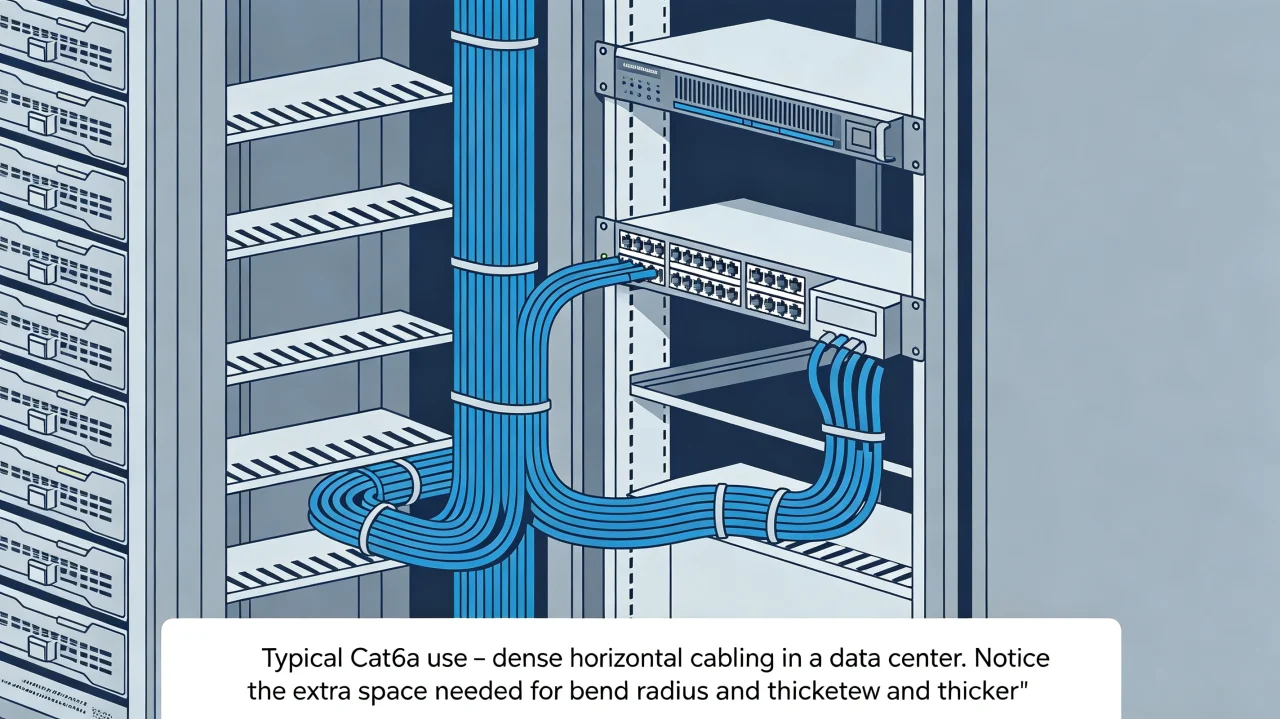
| Cable Diameter | ~6.2 mm (typical) | ~7.5–8.2 mm (thicker) | Cat6a requires bigger conduits and harder pull; conduit fill limit may force you to use fewer cables |
| Connector Type | RJ45 (standard) | RJ45 (often shielded, larger boot) | Shielded connectors need proper grounding; cost jumps per port |
| Cost per Meter (installed) | ~$2–$3 | ~$4–$6 | Budget difference is clear; but future upgrades may justify the premium |
Common confusion: Some think Cat6a always needs shielded connectors. Not true – unshielded (U/UTP) Cat6a exists and works, but in high‑noise environments (industrial plants, near power lines), shielded (F/UTP or S/FTP) is safer. Always check the project environment.
4 When to Use Each – Strengths, Limits, and Trends
Cat6 – The Workhorse
- Perfect for: Gigabit networks (offices, schools, hotels), POE+ cameras (up to 30W), short 10G runs (
- Limitations: Can’t handle full 10G distance; alien crosstalk becomes a problem with dense cable bundles; not a future‑proof choice for 25GBASE‑T (which needs Cat6a or Cat7).
Cat6a – The Heavy Lifter
- Perfect for: Data centers, backbone runs between floors, high‑density surveillance (64+ cameras on a single switch trunk), any project where you plan to keep the cable plant for 10+ years.
- Limitations: Heavier, stiffer, harder to terminate with cheap punch‑down tools; requires bigger cable management; cost can be 2x of Cat6.
Industry Trend – What’s Ahead?
- Cat7 / Cat7a (shielded, 600–1000 MHz) – rarely used outside Europe; expensive and requires special GG45 or TERA connectors. Not gaining traction in North America/Asia.
- Cat8 (2000 MHz, up to 30 m) – for 25G/40G inside racks (switch‑to‑server links). It’s a niche for hyperscale data centers.
- Fiber to the desk – cheaper small‑form‑factor transceivers (e.g., 10G SFP+ modules) are pushing fiber into horizontal cabling. But copper still wins for POE and ease of termination.
5 Side‑by‑Side Comparison – Copper Cabling Grades
| Cable Type | Frequency | Max Speed at 100 m | Typical Use Case | Cost Level |
|---|---|---|---|---|
| Cat5e | 100 MHz | 1 Gbps | Basic office, old installations | Low |
| Cat6 | 250 MHz | 1 Gbps (10G up to 55 m) | Standard gigabit, short 10G | Medium |
| Cat6a | 500 MHz | 10 Gbps | Full 10G, high‑density, future‑proof | High |
| Cat7 | 600 MHz | 10 Gbps | Europe (use GG45), rarely outside | High+ |
| Cat8 | 2000 MHz | 25–40 Gbps (30 m) | In‑rack switch‑server links | Very high |
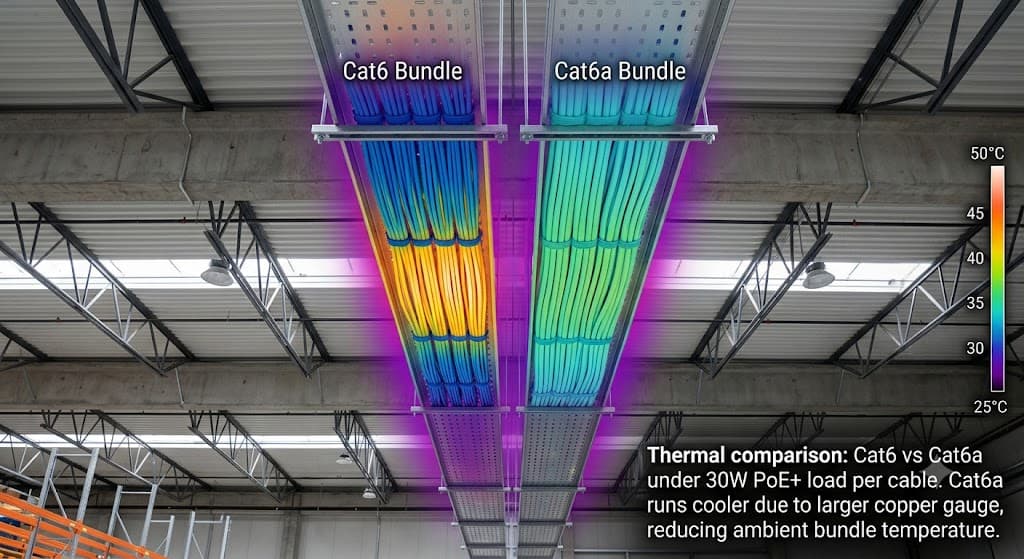
Important nuance: Don’t confuse cable category with POE capability. All Cat5e and above can handle PoE++ (up to 90W) as long as the conductor gauge is adequate. Cat6a’s thicker wire actually runs cooler under high power, which is a bonus for PTZ cameras or Wi‑Fi 6 access points.
6 Practical Example – A Real Installation Call
Situation: A warehouse client wants 4K security cameras, 32 units, each pulling 25W PoE+. The NVR is in the server room 80 meters from the farthest camera. The cable path goes through a ceiling tray packed with 20 other cables (lighting, intercoms, other data).
The decision:
- If you use Cat6, the 80‑meter run will only negotiate 1G (or drop to 100M if termination is bad). The NVR can’t handle 32 cameras at 4K with a 1G trunk – you’ll need multiple links or fiber.
- With Cat6a, the same single cable carries 10G to the NVR. The thick insulation also reduces heating from 32 PoE+ devices in the bundle. The extra cost (~$200 per 80‑meter run) saves buying a second switch, reduces power loss, and future‑proofs for 8K cameras.
Result: Client went with Cat6a. After installation, throughput tests showed 9.8 Gbps stable with no errors. The cable bundle temperature stayed under 40°C (Cat6 in similar scenarios was hitting 45°C).
7 Common Myths – Straight Talk
- Myth: “Cat6a only matters if you run 10G.” – Not true. Even at 1G, Cat6a gives better signal integrity, lower bit error rate, and less retransmission. In Wi‑Fi 6 environments with many access points, cleaner cabling helps reduce interference from adjacent cables. It’s a “nice to have” even for gigabit, but usually overkill unless you plan to upgrade.
- Myth: “All Cat6a cables are shielded and need grounding.” – Wrong. U/UTP Cat6a exists and is fine for most indoor runs. Only use shielded (F/UTP or S/FTP) if you’re near heavy motors, radio towers, or in a hospital MRI wing. Shielded cables that aren’t grounded properly turn into antennas and make noise worse.
- Myth: “Cat6 is always good enough for 10G because the switch can auto‑negotiate to 1G.” – That’s a dangerous half‑truth. The cable plant is the hardest part to replace. If you run Cat6 today and decide to upgrade switches to 10G next year, you may have to pull new cables for long runs. Short runs (
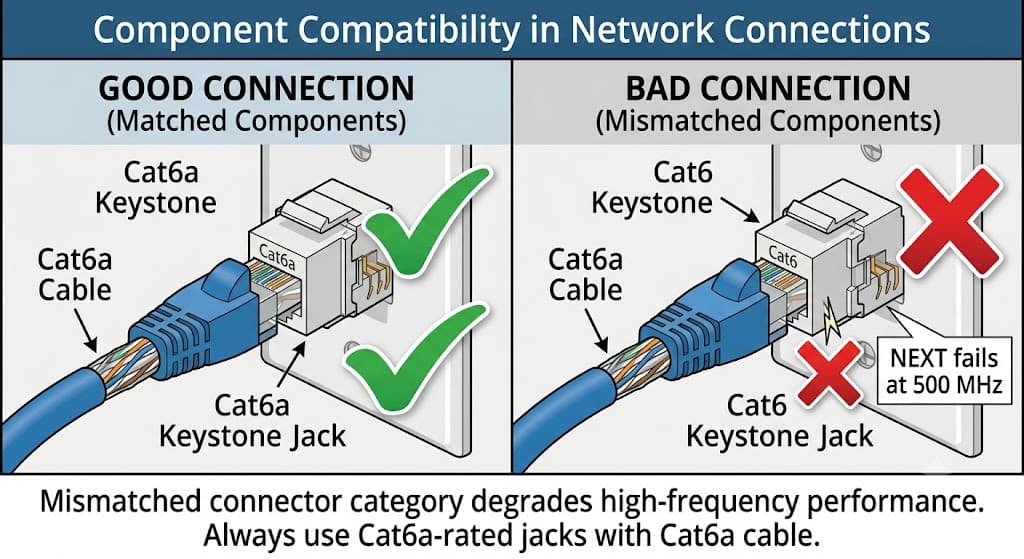
- Myth: “Cat6a connectors are the same as Cat6.” – They look the same physically, but Cat6a connectors have tighter specifications for NEXT and return loss. Cheap Cat6 connectors on Cat6a cable will degrade performance. Always match the cable category with the connector and patch panel – mid‑span mismatch is a common cause of field failures.
Bottom line for sales and support folks: When a customer asks “Do I need Cat6a?”, look at three things – run length (over 55 m = Cat6a), future speed (10G in 3‑5 years = Cat6a), and bundle density (more than 20 cables in a tray = Cat6a). For everything else, Cat6 will get the job done and save money. Never overspec blindly, but also never underspec a cable plant that will be buried in walls for a decade.